Friday, February 5, 2010

Lingering in Locust Point

It's cold. It's cloudy. It's sunrise. Should I sleep in for a few more hours, or return to Locust Point? As you may have guessed, I donned my long underwear (etc.) and chose the latter a couple weeks ago.

I'd been meaning to return to Locust Point for over a year. Ever since my tour of Silo Point last winter, I've been drawn to this nice, out-of-the-way neighborhood of Baltimore. It's a peninsula of row houses surrounded by docks and train yards. Good neighborhoods don't usually play nice with industrials zones, so finding a safe place to park and walk about is tough. Locust Point is the exception with plenty of good street parking and easy access to views of the surrounding industry. The only trouble is that now I just want to go back and capture it from yet another perspective. My 24-105/4 IS was good, but the 17-40/4 seems like it would yield even more interesting shots.

Front Yard

Ready and Waiting

Conduits

Docks

Stop

I've also been wanting to try shots with the camera set down on the ground, inspired by Kevin Meredith and his Low Down series. Locust Point seems like a great subject, though the streets of downtown Baltimore should also work nicely. I wonder if it's possible to attach a small point-and-shoot camera to the side of my shoe for more discrete shooting... hmm.

Sunday, January 17, 2010

Veiny

It's been raining here in Baltimore all day, so I figured this would be a good time to play around with my new Canon EF25 II macro extension tube. After a few close-up shots of my Xpan, I decided that the world didn't need any more camera porn today. I switched over to the broccoli plant that's been surviving living by the window for the past several months.

Veiny

I don't have a true macro lens to compare it to, but I do notice quite a bit of softness in the full resolution image. This could be due to the excruciatingly narrow depth of field. I suspect that it's actually due to the fact that the lens is being pushed beyond its normal parameters by the extension tube. The image that's projected from the back of the lens is significantly larger when the extension tube is attached. As such, any softness in the lens quality is much larger as well.

This is similar to the rule of thumb when using teleconverters. A 2x teleconverter will double your lens's effective length, but will also halve its effective sharpness. This is fine if you've got a very sharp lens, but if you're using a zoom, you may be making some real sacrifices in image quality.

Hopefully I'll get my hands on a true macro 100/2.8 soon so I can make a real comparison. For now though, the EF25 should do for the amount of macro shooting I do.

In the meantime, maybe I'll try shooting in the rain...

Saturday, January 2, 2010

G9 Walkabout

In keeping with all the other blogs out there, I figured I should start the year off right and wish both all of my subscribers a happy new year. Happy New Year!

Baltimore rang in the new year with some surprisingly nice January morning weather, so I decided to take the G9 out for a little walk and see what I could find. I was going for something a little more artsy/Ben Roberts. I need more practice.

Two things I love about living downtown are: a) there's a virtually unlimited number of routes you can take wandering around, and b) the city is always changing. It's organic. Not so much the product of man, but men (men-made not man-made). Anyway, here the take:

Hilton Metallic

Drop Bokeh

MARC Rails

Light Rail

Federal Hill Bench

Also, as some of you might have noticed, I've been adding more back-dated content to the blog. Ever since I took the old TopFivePhotos.com down, I've been wanting to give this blog a little more meat. It's going to be a gradual process, as there were over 200 entries on the old site. The old TopFivePhotos.com didn't have any mechanism for readers to enter comments, so if you have any questions about the older content, please don't hesitate to post.

Happy shooting in the new year!

Tuesday, November 17, 2009

Crop This

8x10, why must you be so square? Your frames and mattes are so readily available, and yet you are virtually useless when it comes time to make a wide landscape print. Your cousin, 8x12, is much more reasonable, and yet nowhere to be found at Michaels or A.C. Moore. If only Aaron Brothers hadn't moved out of Maryland, there might be some hope.

In case you haven't already guessed, I've been in the process of making a lot of prints lately. This seems to happen every year as the weather cools and more time is spent on my butt indoors. It's time to put down the camera and make use of all those photos taken during summer travels. Nostalgic, isn't it?

As for the 8x10 dilemma, perhaps I should just start shooting everything with a Mamiya 7 like Ben Roberts. Then again, he also shoots with an Xpan. :-)

By the way, here's a shot from last March during a special overnight trip to Rocky Gap State Park here in Maryland. It's called Sidling Hill. It's worth a brief stop if you find yourself driving along the I-68 corridor.

Sidling Hill

This is also one of the photos I had to painfully crop down to 8x10. While it does still work, I think the drama of the striations is significantly diminished. Luckily the trees are still there to provide some struggle.

Monday, November 16, 2009

Reproportion

Photojournalists, cover your ears (or eyes, in this case). This does not apply to you.

One of the interesting properties of landscapes is that they can usually be stretched horizontally without anyone noticing. Hills become more gentle, rocks become flatter, but there's nothing particularly odd about that, so most people never question it. Why do we care? Because this can be very useful for creating a panoramic image from a relatively square one.

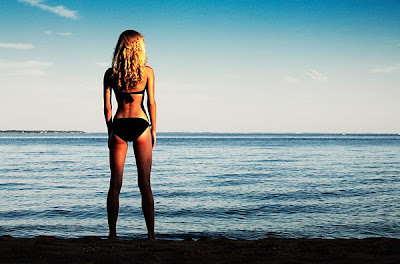
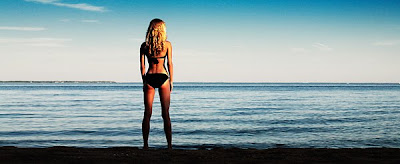
Not only can the image be stretched, but it can be selectively stretched. Here's an example with a single image of Chelsea:


The top image is the original, full frame of the photo. Chelsea clearly wouldn't appreciate it if I'd simply widened the whole image (and her figure along with it). Instead I widened only the areas to the left and right of her by doing the following:

  • Resize the canvas (not the image) to the desired width.

  • Select the landscape to the left of her with the Marquee tool.

  • Edit -> Transform -> Scale...

  • Stretch the selected area to the left until it fills the left side of the canvas and press Enter.

  • Now do the same for the landscape to the right of her.


What I find amazing about this is that widened areas of the image blend right into the unaffected areas. It's a neat trick that can be selectively applied around people, trees, or any figure of known proportion. Give it a try!